Account Delegate
Account Delegate is a role in which an individual is assigned by a Fiscal Officer to approve documents on their behalf at the Fiscal Officer route node. There are two types of Account Delegates:
Primary Delegate — documents are routed directly to the Primary Delegate instead of to the Fiscal Officer. This is used for extended period replacement and long-term absence.
Secondary Delegate — documents are not routed directly to the Secondary Delegate, but the Secondary Delegate will be able to access the Action List of the Fiscal Officer. This is used for temporary replacement, e.g., vacation, sick time coverage. Each Fiscal Officer should have at least one Secondary Delegate assigned for each of their accounts to prevent delays in document processing. If you have been assigned as a Secondary Delegate, see Setting Your Action List as a Delegate for instructions on configuring your Action List.
| Attribute | Primary Delegate | Secondary Delegate |
|---|---|---|
| Documents Routed Directly | Yes — routed directly to the delegate instead of the Fiscal Officer | No — not routed directly to the Secondary Delegate |
| Access to Fiscal Officer’s Action List | Yes | Yes |
| Recommended Use | Extended leave of absence or long-term absence | Temporary replacement (e.g., vacation, sick time coverage) |
| Default Assignment | No — must be explicitly enabled via the Account Delegate Primary Route checkbox | Yes — this is the default when the Account Delegate Primary Route checkbox is left unchecked |
The following guide shows how to create or update an Account Delegate (individual, per account). If interested in editing multiple Account Delegates on one document, please refer to the Account Delegate Global guide.
Before You Begin
Before creating an Account Delegate, ensure you have the following information ready:
- The Chart of Accounts Maintenance User Role assigned to your account. If you do not have this role, contact your Department Security Administrator (DSA) to have it assigned.
- The KFS account number for the account the delegate will be approving transactions on.
- The UCInetID of the individual being assigned as delegate.
- The document type the delegate will be authorized to approve. (Use “KFS” to include all document types.)
- The start date for the delegate’s approval authority.
Create an Account Delegate
-
Log in to ZotPortal and select the Finance/KFS Tab.
-
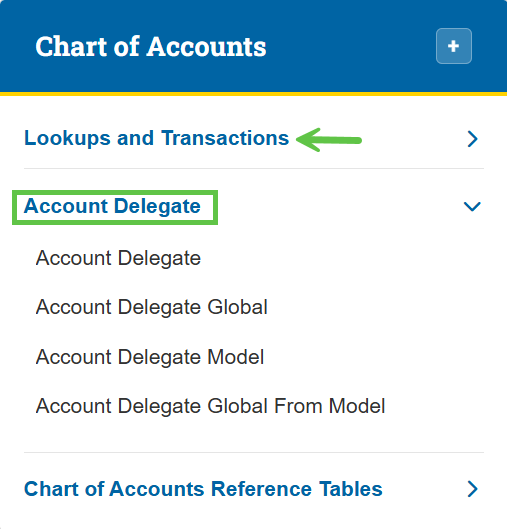
To access the Account Delegate eDoc, navigate to the Chart of Accounts section, expand the Lookups and Transactions menu, and select Account Delegate.

Tip: For step-by-step instructions with screenshots on how to access KFS from the KFS homepage and use the Jump To box (Ctrl+K / Cmd+K) for quick navigation, see the KFS Access Guide.
If you need help logging into the OIT Software VPN, or are unsure about your KFS access, see Accessing the Kuali Financial System. This page also helps you identify your Department Security Administrator (DSA), who can assist with access issues.
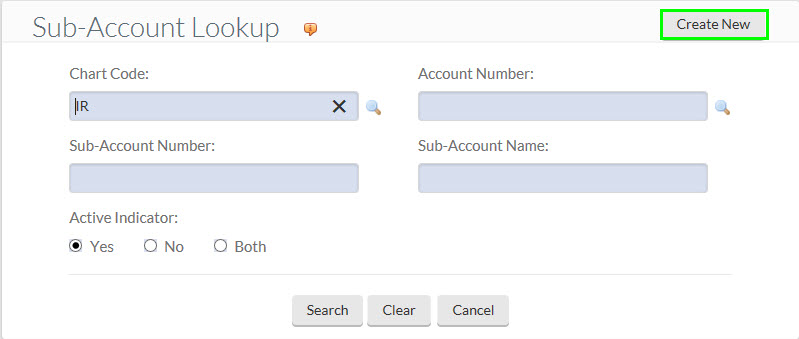
If the Create New button is not visible, contact your DSA to have the Chart of Accounts Maintenance User Role assigned before proceeding
-
- Click the Create New button. Users who do not see the Create New button do not have the Chart of Accounts Maintenance User Role and will need to have this role assigned by their Department Security Administrator (DSA) before proceeding.

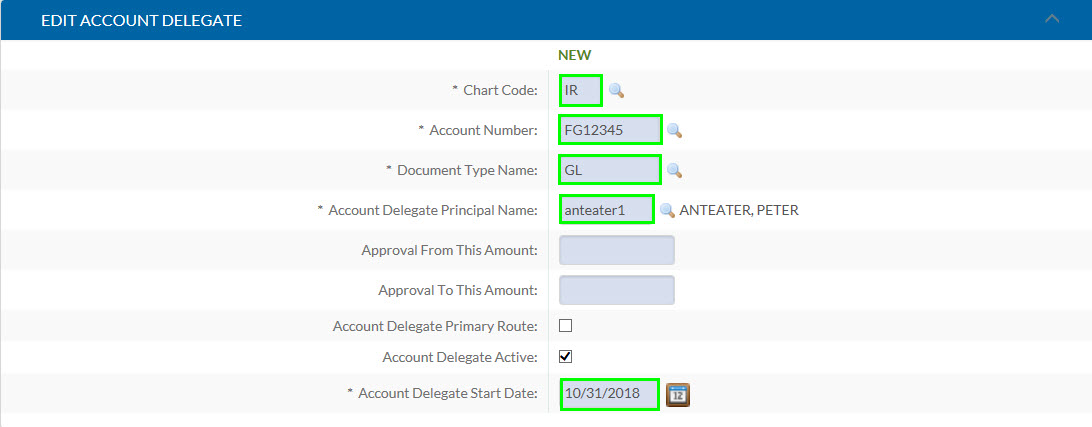
4. Complete the required and optional fields as described in the sections below.
5. Save and submit the eDoc as shown at the end of this guide.

Required Fields
Chart Code: The Chart Code of the KFS account entered into the Account Number field.
Account Number: Enter the KFS account number of the account that the delegate will be approving transactions for. If more than one account number needs to be added, either create additional Account Delegate eDocs, or use the Account Delegate Global eDoc to assign multiple delegates and/or multiple accounts at once.
Document Type Name: Use the lookup to choose the type of document that the delegate will be authorized to approve. A list of KFS document types can be found on our Fiscal Officer web page. (Document type “KFS” includes all document types.)
Account Delegate Principal Name: Enter the UCInetID of the designated delegate.
Account Delegate Start Date: The delegate’s approval authority becomes active on this date. Delegates cannot take action on eDocs that have routed to the Fiscal Officer before they became an approved delegate, regardless of Start Date.
Note: An Account Delegate eDoc is created and finalized on August 2nd at 1:04 p.m., assigning Peter as a delegate. Even if the Account Delegate Start Date is set to August 1st, Peter cannot take action on any eDocs that routed to the Fiscal Officer node before August 2nd at 1:04 p.m.
Optional Fields
Approve From This Amount: The delegate will not be able to take action on eDocs with an amount that is less than the amount entered.
Approval To This Amount: The delegate will not be able to take action on eDocs with an amount that exceeds the amount entered.
Account Delegate Primary Route: Checking this box will make the assignee a Primary Delegate. Leaving the box unchecked will make the delegate a Secondary Delegate (default).
Primary Delegates are only recommended if the Fiscal Officer is on a long leave of absence. Most delegates should be Secondary.
Related Resources
- Setting Your Action List as a Delegate — If you have been assigned as a delegate, follow this guide to configure your KFS Action List so you can begin reviewing and approving documents on behalf of the Fiscal Officer.
- Account Delegate Global guide — Use this guide if you need to assign multiple delegates or update multiple accounts on a single document.
- KFS Document Types — A full list of KFS document types available when setting the Document Type Name field.