Organizations
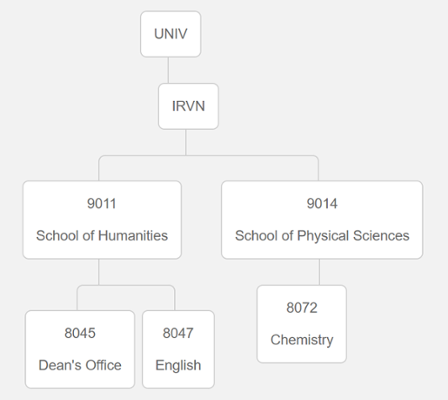
Organizations in KFS uniquely identify units or groups of accounts within the system. Organizations in KFS are defined by a 4 character code. Each Organization Code can report to another organization, creating a hierarchy.
Organizational Hierarchy
Each organizational will belong to a level within the organizational hierarchy. To the right is an example of an Organizational Hierarchy:
See all Organization Codes with Chart of Accounts Dashboard
The Chart of Accounts Dashboard report can be used to see a listing of all org codes. Here is how to find it:
- All reports are listed in the Decision Support Dashboard: https://datawarehouse.uci.edu/decision-support
- Log into the dashboard using your Microsoft credentials
- Select UCI Decision Support in the sidebar navigation
- Expand the "Chart of Accounts" section
- Select "Chart of Accounts (COA) Dashboard"
- Select the "Organization (Org) Heirarchy Lookup" button in the dashboard.